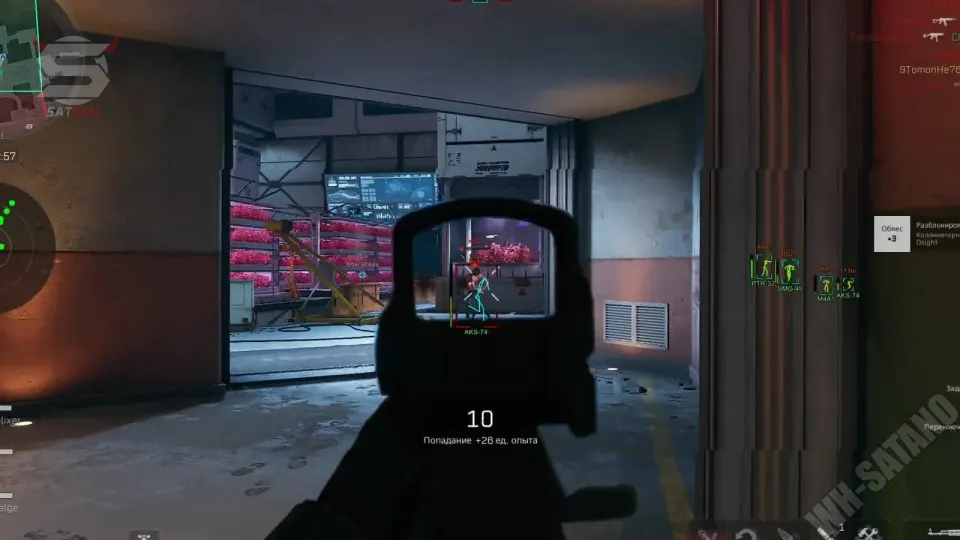
ESP is the information layer of a full Delta Force cheat suite. Done right, it tells you who is near, what loot is worth taking, and which vehicles will win the next rotate. This guide shows how to configure Player ESP, Weapon ESP, Gadget ESP, and Vehicle ESP so the overlay stays useful — not noisy.
ESP Setup Order
Turn modules on in this order:
- Player ESP first — threats before loot
- Weapon & Gadget ESP next — loot and intel once you can survive
- Vehicle ESP last — rotates and escapes on bigger maps
If you enable everything at max detail at once, the screen gets crowded. Start clean, then add layers.
Player ESP Configuration
Player ESP shows enemies through walls, smoke, and buildings. For Operations, this is the core module. Full feature detail is in Player ESP Explained.
What to enable
- Boxes / player outlines — basic through-wall tracking
- Class identification — know the role before you peek
- Health bars — finish cracked targets first
- Name tags — track the same player in chaos
- Distance — pick fights at the right range
Best settings tips
- Keep distance on — it stops bad long peeks
- Keep class ID on for Operations squad fights
- If the overlay feels busy, hide names first, not health
Player ESP pairs best with aimbot. ESP finds the angle. Aim finishes the fight.
Weapon ESP Configuration
Weapon ESP highlights guns on the map and can show attachment details. Use it to stop wasting time on weak loot. See also Weapon and Gadget ESP.
What to enable
- World weapons / ground loot markers
- Attachment details when available
- Filter noise if your menu lets you hide low-value guns
Best settings tips
- Use Weapon ESP early in a raid while you gear up
- Path to built guns first, then fight
- After you are geared, you can lower loot clutter and keep Player ESP primary
Gadget ESP Configuration
Gadget ESP tracks intel, gear, and gadgets that matter for objectives and survival. This is what makes Delta Force operation cheats style play faster — you go to useful items instead of guessing crate routes.
What to enable
- Intel markers
- Gear / utility gadgets
- Mission-related item highlights when available
Best settings tips
- Keep Gadget ESP on during objective pushes
- Combine with Player ESP so you do not get third-partied while looting
- If the map is dense with markers, prioritize intel and key gadgets over everything
Vehicle ESP Configuration
Vehicle ESP shows vehicles on the map. Spawn tracking helps you claim rides before other squads. More detail in Vehicle ESP Explained.
What to enable
- Live vehicle markers
- Spawn tracking / spawn awareness
- Distance to vehicles when available
Best settings tips
- Turn Vehicle ESP up on large open maps
- Use spawn tracking at the start of a match for early mobility
- Watch vehicles with Player ESP — enemy rotates often start at spawn points
Early vehicle control means faster rotates, safer escapes, and better third-party timing.
Recommended ESP Presets
Preset A — Fight Focus
- Player ESP: full (class, health, distance)
- Weapon / Gadget ESP: low or off after geared
- Vehicle ESP: on if the map is open
Best for mid-raid PvP when you already have guns.
Preset B — Loot Focus
- Player ESP: on (never loot blind)
- Weapon ESP: full
- Gadget ESP: full
- Vehicle ESP: optional
Best for the first minutes of Operations while you build a loadout.
Preset C — Rotate / Escape Focus
- Player ESP: full
- Vehicle ESP: full + spawn tracking
- Weapon / Gadget ESP: medium
Best for late-game extracts, long rotates, and open-lane maps.
How to Keep ESP Clean
- Do not max every filter at once
- Player ESP stays on in almost every situation
- Loot ESP can drop once your kit is ready
- Vehicle ESP matters more on big maps than tight buildings
- Change one module at a time so you know what helped
Quick Configuration Checklist
- Enable Player ESP with class, health, and distance
- Add Weapon and Gadget ESP for early loot and intel
- Add Vehicle ESP + spawn tracking for rotates
- Switch to Fight Focus once geared
- Pair with aimbot settings for a full Delta Force hack combat stack
That is a clean ESP configuration for Delta Force in 2026 — clear threats, smart loot, and better map control.